|
|
I've been using CDex for an age in it's various versions... And whilst it works just fine out the box. I though just a few quick tips to get the best out of it might be useful.....
Options > Settings...
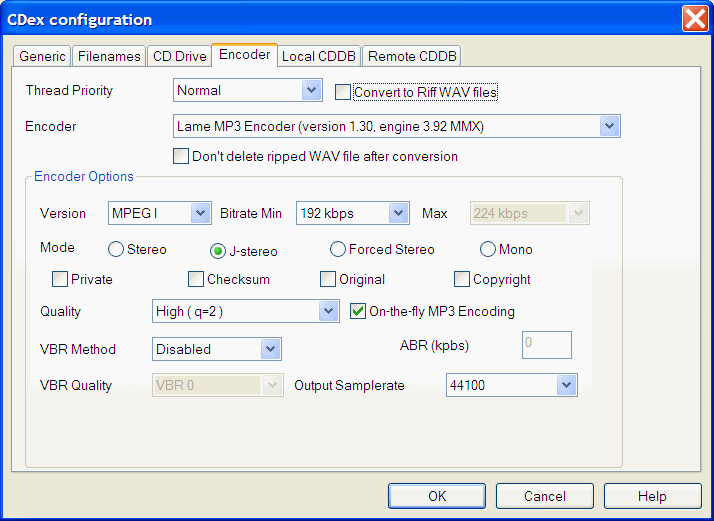
Encoder Tab.....
- 'Bitrate Min' - By default this is set to 128kbps and many people think this is fine. I would point out that 128 was the standard many years ago when computers were slower and hard disks were a lot smaller. It was also used for file sharing when internet connections were slower. For me 192kbps is the best option here. Providing a noticable improvement in quality at a reasonable size.
- 'Mode' - The default here is 'stereo,' by enabling 'J-stereo' the encoder will expolit the similarities between the Left and Right channels. The effect of this is a significant improvement in quality.
- 'Quality' - Again the defaul is 'Normal (q=5),' the documentation with CDex suggests that increasing the quality will slow down the ripping process, in practice though this is not the case. On all but the oldest of systems, the weak link is going to be the CD drive, not the CPU, (on my Centrino based system CPU load is ~4%, but my drive is pretty slow,) so increasing the quality just makes good sense i suggest 'High (q=2).'
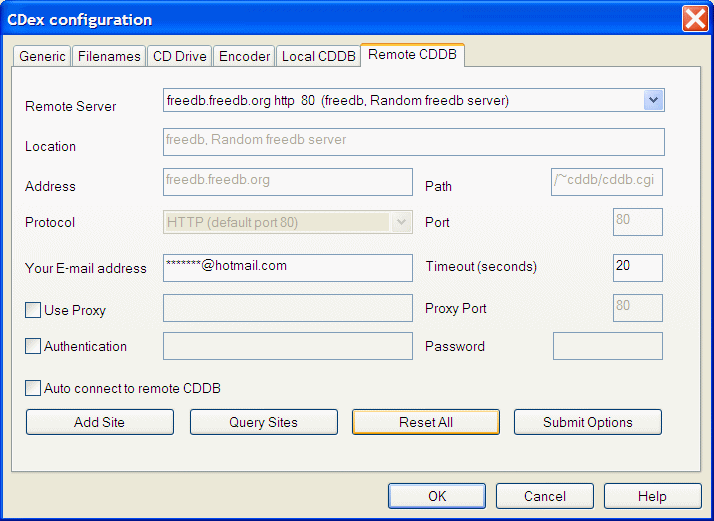
Remote CDDB...
- It's probably worth mentioning that this e-mail address does not need to be one that you use. Incase you don't know what this does, it looks up the information about your cds, filling in the track and artist names for you.